
SERVER ROOM CLEANUP & AUDIT
One Failing Component Can Bring Down Everything
Your Server Room
Is a Disaster
Waiting to Happen.
Dust-clogged servers. Mystery cables nobody can trace. Equipment from 2009 still holding your business together. We've seen it all — and we've seen what happens when it finally gives out. Don't wait for the emergency. Let us clean it up before you lose everything.
- WARNING SIGNS YOU'RE AT RISK
- Server intake vents visibly dusty or clogged — a leading cause of thermal shutdown and component failure
- Cables you can't identify running to devices nobody can account for
- Windows Server 2008, 2012, or 2016 still in use — no longer receiving security patches
- UPS batteries that haven't been tested or replaced in more than two years
- No current network diagram or hardware inventory — nobody knows what's connected
- Backup drive arrays with aging HDDs showing S.M.A.R.T. errors or reduced capacity
80%
Business Day Response
Our commitment to every client — fast, reliable, consistent support
50%
Rely on Outside Support
Over 50% of small and mid-sized businesses depend on external IT partners
1
Business Day Response
Our commitment to every client — fast, reliable, consistent support
24/7
System Monitoring
We catch problems before they become your problems
A Neglected Server Room Isn't Just Messy. It's a Liability That's Growing Every Day.
Most small businesses inherit their server room. It got built up over years — equipment added here, a cable run there, an old server left running because nobody wanted to touch it. By the time something goes wrong, it takes the whole network with it.
- What We Find in Neglected Server Rooms
- Servers running 24/7 at temperatures 20–30°F above safe operating range due to dust buildup and blocked airflow
- End-of-life hardware — some running OSes from 2008 — with known, unpatched critical vulnerabilities on the live network
- UPS batteries that are years past replacement cycles, providing zero protection during a power event
- Unlabeled cables connecting unknown devices — including equipment that no longer serves any business purpose
- RAID arrays with failed or degraded drives showing errors that have been silently accumulating for months
- No documentation — if the person who built it leaves, nobody knows how to troubleshoot or recover
- Personal and business equipment mixed together on the same network with no segmentation
- Fire hazards from overloaded power strips, improper cable bundling, and blocked ventilation
- After a LeapFrog Cleanup & Audit
- Every server operating within safe thermal ranges — hardware life extended significantly and risk of sudden failure reduced
- End-of-life equipment identified, documented, and prioritized for replacement before it causes an outage
- UPS batteries tested, replaced if needed — your equipment protected against the next power surge or outage
- Every cable labeled, traced, and documented with a physical network diagram you can actually read
- Drive health checked on all arrays — failing drives replaced before data is lost, not after
- Complete hardware inventory and network map in your hands — your team can troubleshoot without calling us
- Business and personal traffic separated; network security posture documented and tightened
- Fire and safety hazards remediated — power strips replaced, airflow restored, cable management installed
The Most Dangerous Situation We See: The Server Nobody Wants to Touch
In almost every server room cleanup we do, there's at least one piece of equipment that's been running for 8–12 years that nobody touches because "it's working." That server is running a version of Windows Server that stopped receiving patches years ago, has drives that are well past their rated lifespan, and sits on the same network as everything else in the building. It's not a question of if it will fail — it's when. And when it does, it often takes backups, network access, or critical business data with it. We find it. We assess it. We give you a plan before it becomes a crisis.
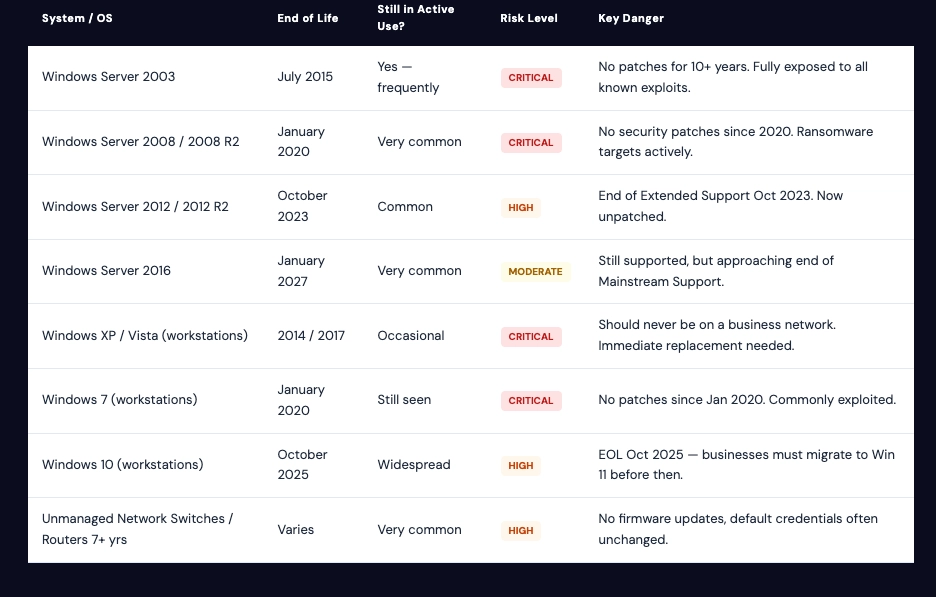
ND-OF-LIFE REFERENCE
Is Your Software Still Receiving Security Updates?
Common Systems Still Running in Small Business Server Rooms — and Their Risk Level.
End-of-life software doesn't just miss features — it stops receiving security patches. Every day it runs on your network is an open door for ransomware, data theft, or compliance violations.
WHAT WE DO
Our Server Room Cleanup & Audit Process — Start to Finish.
We don't just vacuum and leave. Every engagement ends with a complete documented picture of your infrastructure and a prioritized action plan based on actual risk — not guesswork.
Step 01
Physical Cleanup & Thermal Assessment
We start where the risk is highest — the hardware itself. Servers, switches, patch panels, and rack equipment are cleaned, airflow paths are cleared, and we measure operating temperatures before and after.
- Compressed air cleaning of all server intake and exhaust vents
- Rack organization — equipment repositioned for proper airflow
- Temperature logging before and after cleanup
- Identification of equipment running outside safe thermal limits
- Cable tray cleanup and organization
Step 02
Hardware Inventory & Network Mapping
We document every device in the room and trace every cable. By the end, you have a physical network diagram, a hardware inventory, and a clear picture of what's connected to what — and why.
- Full hardware inventory: make, model, age, serial numbers
- IP address mapping for all network devices
- Physical network diagram created or updated
- Identification of unauthorized or unknown devices
- Cable labeling — every run identified at both ends
Step 03
Health Checks & Risk Audit
We run diagnostics on the systems that matter most. Drive health, OS patch status, UPS battery condition, and security posture are all assessed and documented with specific risk ratings.
- S.M.A.R.T. diagnostics on all drives and RAID arrays
- OS and software EOL status check for all servers and workstations
- UPS battery test and replacement recommendation
- Patch and update status review on all servers
- Basic network security posture assessment
Step 04
Power & Safety Remediation
Overloaded power strips, improper cable bundling near heat sources, and blocked cold aisles are fire hazards that most businesses overlook. We fix what we can on-site and flag everything else.
- Power strip audit — identify and replace consumer-grade strips in server environments
- Proper PDU installation recommendations if needed
- Cable bundling corrected to remove heat retention near equipment
- Cold and hot aisle identification and correction
- Grounding and surge protection review
Step 05
Decommissioning Old Equipment
That server nobody wants to touch? We assess it, back up anything worth keeping, and give you a clear recommendation. If it needs to come down, we handle it properly — data wiped, hardware recycled responsibly.
- Identification of equipment safe to decommission
- Data migration or archival before any shutdown
- Secure data erasure on decommissioned drives (DoD 5220.22-M)
- Responsible hardware disposal and documentation
- Rack space reclaimed and organized after removal
Step 06
Deliverables & Prioritized Action Plan
You walk away with more than a clean room. Every finding is documented in a written report with risk ratings, repair costs, and a prioritized roadmap — so you know exactly where to spend your IT budget next.
- Written audit report with photos before and after
- Hardware inventory spreadsheet
- Current network diagram (Visio / PDF)
- Risk matrix with critical, high, and medium findings
- Prioritized 90-day IT roadmap with estimated costs
What We Build
Server Room Cleanups Aren't Just for Large Enterprises.
If your business relies on a server for file storage, email, a phone system, point-of-sale, or any shared business application — your server room matters. These are the situations we handle most often.
Small Offices With No Dedicated IT Staff
The original tech who set everything up left years ago. Nobody has touched the server room since. We come in, assess the current state, clean it up, and leave you with documentation your team can actually use.
Medical, Legal & Financial Offices
Regulated industries can't afford data loss or a breach. If you're storing patient records, legal files, or financial data on aging infrastructure, you have compliance exposure in addition to operational risk. We prioritize security posture in every audit.
Businesses Moving or Expanding
Moving offices or adding a location is the perfect time to audit what you have before you bring it to a new space. We document everything, identify what's worth moving, and help you plan the new setup correctly from day one.
After an Outage or Near-Miss
If you've already had a server failure, unexpected downtime, or a close call with data loss — don't let it happen again. A post-incident audit identifies what failed, what else is at risk, and what needs to be fixed before the next event.
WHY LEAPFROG
Serving Long Island Since 1998
We've Been Inside Small Business Server Rooms for 27 Years.
We Know What Breaks — and Why.
- We don't scare you into buying new equipment — Our audit tells you what actually needs attention now, what can wait, and what's fine as-is. You get honest recommendations, not a sales pitch.
- Everything is documented and left with you — Network diagrams, hardware inventories, and the audit report are yours. You're not dependent on us to understand your own infrastructure.
- Veteran-owned, minority-certified small business — We understand the pressures and budget realities of running a small business because we live them every day. We prioritize impact over billable hours.
- We handle the whole picture — From physical cleanup to security posture to data protection strategy, we connect the dots across your entire IT environment — not just the room.
Don't Wait for the Server to Fail.
Schedule a free walkthrough and find out what's actually at risk in your server room — before it costs you days of downtime and thousands in emergency recovery.
- Free Initial Walkthrough
- Written Audit Report Included
- Network Diagram Delivered
- Long Island & Greater NY